 Embertrail
A ring that fills each day
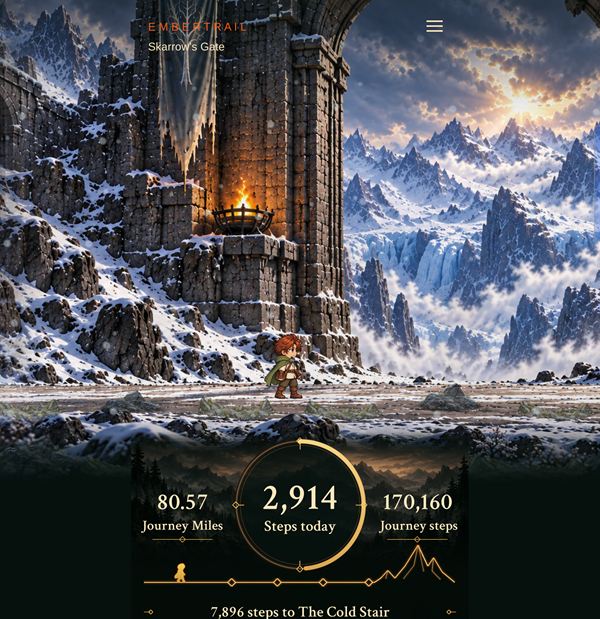
Watch the home ring fill toward 6,000 steps. Once it's full, the extra steps go toward your next companion.
An illustrated walking journey for your phone
Your daily steps move your traveler along an exciting journey, with gorgeous scenery, and companions to discover at your own pace.
Coming to Android first (Android 14 or newer). An iPhone version is in development.
Android development preview · installation access is being prepared
85story locations
208areas to explore
2.19 millionsteps from start to finish
6,000steps in the daily goal
How it works
Embertrail reads your step reports from Health Connect on Android. A Wear OS watch is optional.
Your steps move your traveler along the road, and the scenery changes as you go.
Reach new places, meet fellow travelers, and earn companions and new looks along the way.

Walk · discover · adventure
Travel outward and home again through 13 regions. At 6,000 steps a day, the planned route spans roughly a year. Take the journey at your own pace, and revisit reached places in your Journal.
Your first stop, Eaves Camp, is just 1,056 steps away.
A selection of the 85 story locations, shown with total journey steps.
Gorgeous scenery
Scenery from three regions of the route, each shown with its nearby story location.



Companions
Steps beyond your daily 6,000 become Companion Steps, and they add up across days. Every 24,000 Companion Steps, a new friend joins you. Companions are part of the journey and don't change your step count.
Companion Steps needed for each friend, counted from the start of your journey. Companion Steps are the steps you walk beyond 6,000 in a day.
Inside the app
Screens from the current Android preview.
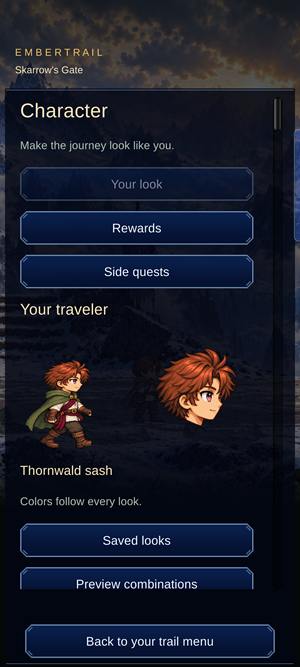
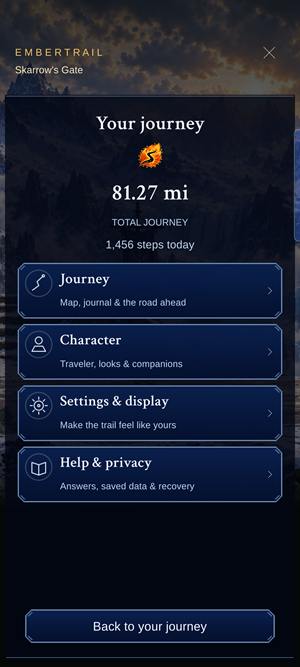
In the Android preview
Watch the home ring fill toward 6,000 steps. Once it's full, the extra steps go toward your next companion.
People you meet on the road join you for part of the way. Bram, Fennick, Halla and Sefa each walk a stretch, and their stories move on as you reach new places.
Browse earned looks, presets and outfit previews as your journey unfolds. Modular customization is currently a preview feature.
Daily Journal pages, a view of your recorded week, every place you've reached, and images you can choose to share.
Add a widget to see your trail and traveler at a glance, and tap it to open the app.
An optional Wear OS companion and watch face show today's steps.
Room to rest
Take a long walk, a short one, or the day off. There's no streak to protect and no race to win. Your journey keeps its place.
Coming to Android first
Embertrail is in Android development preview, and installation access is still being prepared. Join the waitlist and we'll let you know when you can try it.
Join the waitlistAndroid development preview · installation access is being prepared
Requires Android 14 or newer. A Wear OS watch is optional.
An iPhone version and shared journey features are in development and are not available in this preview.
Read the Android preview detailsBefore you begin
Embertrail is in Android development preview, and installation access is still being prepared. Join the waitlist and we'll let you know when it opens.
Android 14 or newer. To check yours, open Settings and look under About phone for the Android version. An iPhone version is in development and isn't available yet, and there's no release date.
Pricing hasn't been announced yet. Join the waitlist to hear first.
Embertrail reads step reports from Health Connect on Android. If your tracker's app shares steps with Health Connect, those reports can be included, and Health Connect's source priority decides which source counts when they overlap. We haven't confirmed specific brands or devices yet.
Embertrail uses step reports from Health Connect on Android. A Wear OS watch is optional. Phone and watch totals are reconciled rather than simply added together: Health Connect settles overlapping periods using your source priority, so a walk is counted once. Reports can arrive late or be corrected, and physical accuracy checks are still in progress. Optional motion feedback animates your traveler without creating extra credited steps.
Each day, credited steps beyond the 6,000-step daily goal become Companion Steps. They accumulate across days, and every 24,000 Companion Steps unlocks the next companion. Companions do not add to your step count.
Your journey keeps its place, and there's no penalty for resting. Later corrections from your step source can adjust recent counts.
Optional background step updates are best effort, roughly every 30 minutes, and Android may delay them.
No account is needed for the personal journey. Your journey progress and diagnostics are stored on your phone, the app doesn't request GPS or microphone access, and you choose when to export a backup or share an image. Read the privacy details.
No. There's no automatic cloud restore. Backup & restore in Help or Privacy saves a portable journey file you can review before restoring. Keep that file outside the app before changing phones or uninstalling. Shared images are keepsakes, not backups.
Not yet. Shared journey features are in development and are not available in this preview. Your personal journey works on its own.
No. The demonstration is separate from your real journey, Journal places, companions and earned looks.